Espresso: The Handwritten Font That Captures Holiday Cheer and Traveler Spirit
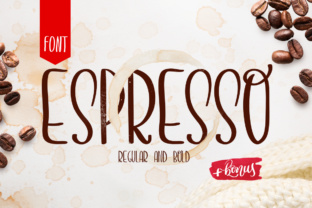
When you want a typeface that feels like a warm morning cup of something familiar, or a handwritten note from a friend you haven’t seen in years, Espresso delivers. It is a font designed with restraint and character—simple, handwritten, and full of lightness. Dedicated to the archetypical traveler, it evokes enjoyment of the simple things in life. Whether you’re designing for a holiday campaign, a travel blog, or a personal project that needs a touch of human warmth, Espresso can be a beautiful choice. But like any tool in your design kit, it works best when you understand what it is—and what it isn’t.
Many people first encounter Espresso while searching for a casual, approachable font. They see the soft curves, the slightly uneven baseline, and the friendly, unpretentious feel. The temptation is to drop it into everything from business cards to e‑books. Yet that enthusiasm often leads to common mistakes that dilute the font’s charm or cause practical problems. Let’s walk through those pitfalls and, more importantly, how to side‑step them so Espresso helps your work shine.
Mistake #1: Treating Espresso Like a Workhorse Body Font
Espresso is a handwritten face—loose, organic, and intentionally imperfect. Its beauty lies in that irregularity, but that same quality makes it unsuitable for long‑form reading. When you set paragraphs of body text in Espresso, readers tire quickly. The uneven rhythm and lack of consistent stroke weight slow down comprehension, especially on screens.
A better approach: Reserve Espresso for headlines, pull quotes, subheaders, or short decorative copy. Pair it with a clean, neutral serif or sans‑serif for your main body text. For example, use a light, spacious sans like Open Sans or Lato at 16‑18 pixels, and set your main header in Espresso at a generous size. The contrast gives your layout energy while keeping reading comfortable. If you absolutely need a handwritten style for body copy, look for a more structured script or a monolinear handwritten font designed for legibility at smaller sizes.
Mistake #2: Ignoring the Importance of Context and Audience
Because Espresso feels playful and nostalgic, it’s tempting to use it everywhere a “friendly” tone is needed. But that friendliness can backfire if your audience expects formality, technical detail, or authority. I once saw a legal firm’s infographic using Espresso for disclaimers. The mismatch between the serious information and the whimsical font eroded trust. Similarly, using it for an educational course on advanced data analytics might feel forced rather than inviting.
Better approach: Map your font choice to the emotional tone you want. Espresso suits travel blogs, holiday card designs, creative portfolios, café menus, personal journals, and light‑hearted brand stories. For professional or high‑stakes content (contracts, medical advice, financial reports), relegate Espresso to decorative accents—maybe a quote at the top or a small graphic element—and use a neutral font for everything else. Always ask: “Does this font make the reader feel the way I intend?”
Mistake #3: Overlooking How Legibility Changes at Different Sizes
Handwritten fonts often include delicate strokes, fine hairlines, and open shapes. In Espresso, some letters like the lowercase “e” or “a” can close up at small sizes. At large display sizes (48px and above), the details are glorious. At 14px, the same details become fuzzy on screens and virtually unreadable in print.
Better approach: Always test Espresso at the exact sizes you plan to use. Download the trial version or use a web‑based preview tool. Zoom in, zoom out. If you need a handwritten feel at small sizes, consider a different handwritten font that was designed for body text—perhaps one with a larger x‑height and simpler letterforms. For Espresso, stick to sizes above 24 pixels for digital, and above 18 points for print. Also test on different backgrounds: light, medium, and dark. Some handwritten fonts lose their charm when reversed out of a busy photo.
Mistake #4: Choosing Incomplete Versions or Unreliable Sources
I’ve watched many well‑meaning designers download “Espresso” from a free font site, only to discover later that the version lacked crucial glyphs—no accented characters, no ligatures, or broken kerning. Worse, some bundled copies include extra spacing errors or malware. That search for a free download ends up costing time, frustration, and eventually the need to repurchase.
Better approach: Buy Espresso from a reputable foundry (such as the original type designer or an authorized reseller). Look for a full character set that supports the languages you need—especially if you work with European accents or non‑Latin scripts. Check whether the license covers web use, embedding, or commercial use. A professional font purchase usually comes with a license that spells everything out. If you’re on a tight budget, look for “Espresso” on platforms like Adobe Fonts (if included) or use the demo version that clearly states its limitations. Avoid pirated or “free for personal use only” versions that vanish when you try to publish.
Mistake #5: Forgetting to Adjust Spacing and Kerning
Handwritten fonts rarely come with perfect automatic kerning. Because they mimic natural pen strokes, individual letter pairs often need manual love. The combination “rn” can look like “m” if spacing is off. The word “play” can appear crowded, while “wide” stretches too far. Many users set Espresso at the default tracking (letter spacing) and never touch it, which leads to uncomfortable gaps or clumps.
Better approach: Spend time with your design software’s kerning and tracking controls. For headlines, try opening up the tracking by +10 to +20 units for a breezier feel. For tighter headings, decrease tracking slightly but check every problematic pair. Use the “Optical” auto‑kerning option as a starting point, then manually adjust pairs like “Te”, “Vo”, “Wa”, and “rn”. If the font includes OpenType features, enable standard ligatures—Espresso likely has a few that improve letter joining. Test your final headline by printing it at full size or showing it on a large monitor. Poor spacing undermines the very restfulness Espresso is meant to convey.
Mistake #6: Using Espresso Without a Clear Design Purpose
When a font is beautiful and friendly, it’s easy to add it to a project “because it looks nice.” But without a clear reason, the design becomes inconsistent. You end up mixing four fonts, each competing for attention. Espresso, with its distinct voice, needs a specific role. If it shouts next to a decorative script, the page feels chaotic.
Better approach: Give Espresso a single, intentional job. For a holiday social media graphic, make it the voice of the headline. For a travel journal, use it for the title and maybe a date stamp. For a coffee‑shop flyer, set the menu items in a clean sans and use Espresso only for the shop’s tagline. Less is more. When Espresso appears sparingly, it retains its special quality. If you overuse it, the novelty fades and readability suffers. Think of it like your favorite spice: a pinch elevates a dish; a whole jar ruins it.
Mistake #7: Neglecting the Impact on Different Media
Espresso was likely designed primarily for display and print, but many people use it on websites or mobile apps without testing responsiveness. At small viewport sizes, the handwritten strokes can blur. On low‑DPI monitors, the fine details vanish. In print, if you set it too small or on uncoated paper, the ink may bleed, closing up counters and making letters illegible.
Better approach: Before committing, prototype Espresso in every medium you need. For web, embed it via @font‑face and test in Chrome, Safari, Firefox, and Edge at different breakpoints. If it fails at mobile size, either enlarge it or use a fallback script font. For print, request a physical proof if possible, or simulate the paper stock in your software. Adjust ink coverage if necessary. If you’re designing for a client, explain these limitations early so they understand why the headline needs to be large and the body text needs a companion font.
The Right Way to Embrace Espresso’s Restraint
Espresso is at its best when you honor its simple, handwritten nature. It invites readers into a story, but it doesn’t try to do everything. Use it for holiday promotions, personal diaries, travel quotes, or branding for a boutique café. Pair it with a clean sans‑serif for structure. Give it generous whitespace, which reinforces the lightness the font promises. Avoid layering it on complex background patterns, and never distort its proportions by stretching it—a handwritten font should keep its original letter shapes intact.
If you’re evaluating Espresso for a new project, start by asking: “What is the mood I want my reader to feel?” If the answer includes warmth, nostalgia, simplicity, or casual delight, you’re on the right track. Then examine the specifics: size, medium, language needs, and pairing font. By avoiding the common mistakes—using it as body text, ignoring spacing, buying incomplete copies, or forcing it into the wrong context—you allow Espresso to do what it does best. It restrains itself, and in that restraint, it becomes extraordinary.